Wordle Unlimited Unblocked
Wordle Unlimited Unblocked is our free and no-limit version of the classic Wordle game—no registration, no waiting, and no daily cap. The original NYT Wordle gives you one puzzle every 24 hours. Here, you get as many as you want. Choose a mode, start guessing, and keep going for as long as you like.
Guess the Wordle hidden word in 6 attempts.
You have six attempts to guess a hidden five-letter word. Type any valid word and press Enter—the tiles will change color to tell you how close you are. Green means the correct letter in the right spot. Yellow means the letter is in the word but in the wrong position. Gray means it’s not in the word at all. Guess it correctly and the next puzzle will load immediately.
To guess the hidden word in 6 attempts, you will need to use valid 5-letter words. You cannot enter random letters. Once you have guessed the word, hit the enter button and the tile color will change. Good luck!
Wordle Unlimited Strategy Tips
To improve your chances of winning, it helps to start with words that include common vowels and consonants. Popular starting words like STARE, ARISE, SLATE, or IRATE reveal useful letter information early in the game.
Pay close attention to the color feedback after each guess and use the process of elimination to narrow down possibilities. Remember that letters can appear more than once in a word, so guesses like LEVEL or SPEED are completely valid.
New Features Added to Wordle Unlimited
1. Core Gameplay Modes
Daily Challenge
- The Global Puzzle: A single word appears once every day and every player sees the same puzzle.
- Streak Building: Win daily puzzles consecutively to build a streak; the streak resets if you miss a day.
- Resuming Progress: If you close the game mid‑puzzle, your current progress saves locally so you can return and finish.
Unlimited Practice
- Continuous Play: Finish one game and start another immediately — there is no 24‑hour wait.
- Vocabulary Training: Use this mode to test new strategies or practice words from other languages.
Word Categories
- Themed Puzzles: Choose puzzles based on topics such as Animals, Technology, Food, Movies, or Science.
- Fixed Language: Category word lists run on the English engine (/en/) to keep word quality consistent.
- Multi‑language Support: The game includes more than 80 languages so players worldwide can play in their native tongue.
Time Attack
- The Blitz Mode: Solve as many words as you can before the 5‑minute timer expires.
- Dynamic UI: A pulsing timer and progress bar change color from Green → Yellow → Red as time runs out.
2. The Archive System (Never Miss a Day)
- Calendar Integration: Browse a full visual calendar by month and year to find past puzzles.
- Historical Play: Open and play any Daily Challenge from the archive — ideal for completionists.
- Persistent Sessions: Archive puzzles save progress just like Daily mode, so you can leave and return without losing your place.
3. The Hint & Coin System
- Economy (Coins): Every player starts with a base coin balance (for example, 100 coins). You earn more coins by winning games.
- Hint Mechanics:
- Hint Cost: Each hint costs 50 coins.
- How It Works: Tap the lightbulb to reveal one correct letter in its exact position that you have not yet uncovered.
- Strategic Limit: Hints disable once you reach the maximum number of guesses or the game ends.
4. Advanced Customization: Word Length & Difficulty
Word Length (4 to 10 Letters)
- Scalable Difficulty: Choose words from 4 letters up to 10 letters to match your skill level.
- URL Routing: The URL updates to reflect the chosen length (for example, /en/6-letter-wordle), which makes it easy to share specific challenges.
Three Difficulty Tiers
- Easy Mode: Offers 8 guesses — great for beginners and children.
- Medium Mode: Keeps the classic 6‑guess experience.
- Hard Mode: Limits you to 5 guesses; combine this with hints for a truly demanding challenge.
5. Global Language & Multi‑Keyboard Support
- Native Experience: Support includes English (US/UK), Spanish, French, German, Urdu, and many more.
- In‑Game Keyboards: Each language uses its appropriate keyboard layout — for example, the Urdu keyboard shows native script and the Spanish keyboard includes Ñ.
- Layout Settings (English): Choose QWERTY, QWERTZ, AZERTY, Dvorak, or an Alphabetical (A–Z) layout for educational purposes.
6. Deep Stats & Performance Tracking
- General Stats: View total games played, win percentage, and best streaks.
- Guess Distribution: See a bar chart that breaks down how often you win in 1, 2, 3…6 guesses.
- Mode‑Specific Stats: Compare performance across Daily, Unlimited, and Time Attack.
- Difficulty Breakdown: Track results for Easy, Medium, and Hard to see where you perform best.
- Neutral Visuals: Clean black‑and‑white progress bars and a neutral aesthetic for a premium look.
7. Custom Settings & Options
- Dark / Light Mode: Switch between themes to reduce eye strain.
- Colorblind Mode: Enable high‑contrast colors and symbol markers so color vision differences won’t block gameplay.
- Sound Effects: Toggle quality audio for key presses, correct answers, and errors.
- Challenge a Friend: Generate a unique link with a hidden word you choose and send it to friends to challenge them.
Here's how to play Wordle Unlimited Free.
Click on the gear icon at the top of the screen to choose your game mode. 'Daily' gives you the same puzzle everyone is playing that day. 'Hourly' refreshes the word every hour. 'Infinite' allows you to play consecutively without breaks. Close the settings and the game will start immediately. You can change modes at any time by tapping the UnscrambleIt logo at the top of the screen.
Is There a Time Limit in Wordle Unlimited?
There is no time limit in Wordle Unlimited. You can take as much time as you need between guesses, making the game more about strategy and thinking rather than speed.
What do the colors in Wordle mean?
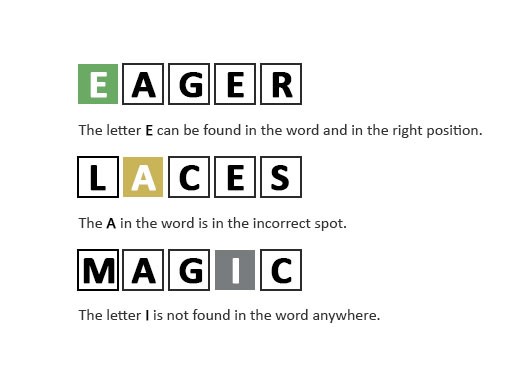
In this game Wordle unlimited words, you are given 6 tries to guess a word. After each try, the letter background will change to indicate how close you are to the correct letter. A Grey background means the letter is not in the word, a Yellow background means the letter is in the word but not at the correct position, and a green background means the letter is in the word and at the correct position. The word will always be a valid word found in a dictionary.
- WIf the letters are in the right places, they will turn green.
- OIf the letter is in the word but not in the right spot, it becomes yellow.
- RIf the letter becomes gray, that letter is not in the word.
Gameplay Example
What Happens After 6 Attempts?
If you guess the correct word within six tries, the game will show your result and allow you to start a new round immediately. If you use all six attempts without finding the word, the correct answer will be revealed so you can learn from it and try again.
Since Wordle Unlimited is unblocked and endless, you can restart and keep playing as long as you like.
Wordle Frequently Asked Questions (FAQ)
No. The game supports 4–10 letter words, allowing scalable difficulty and broader vocabulary coverage.
Yes. Hard Mode forces players to reuse previously discovered letter information.
Yes. Players can generate custom puzzle links for shared gameplay sessions.
Yes, the game supports more than 100 localized language dictionaries with native keyboard layouts and character systems.
Yes. Words such as “LEVEL” and “SPEED” contain repeated letters and remain valid.
We have developed a powerful Wordle Solver and Wordle Finder, a tool that helps players identify possible word solutions based on the letters and clues given after each guess.
How to Make Wordle Harder?
When you open up a Wordle, by default it is in Normal mode. To make the words harder to identify, you need to switch to Hard mode. Here's how:
- Go to the settings icon (the Gear icon) in the top right corner of the screen.
- Activate the Hard mode.
- Close the dialogue box.
You will now see that your Wordle is harder to solve.